Friday, March 20, 2009

AOL Instant Messenger (AIM) v6: A Waste of Time

Aim (AOL Instant Messenger), which runs on the OSCAR protocol, is one of the world's most popular IM protocols, being available everywhere, including integrated with Google Talk in Gmail. The AIM client is a free download at the official AIM Site. You might want to hold off on that download for now. If you want to uninstall or uninstalled, note that it might not have uninstalled cleanly. See end of review for details.

AIM 6.5, 6.8, and 6.9 Beta:

15/100: A Waste of Time. Not worth even trying.
AIM: AOL Instant "Messing-ger"

Why the harsh rating? Being a large company and serving so many flashy ads is one thing, but force installing adware products, and being adware itself, is unacceptable.

Real Time IM:

Version 6.8 and above have a nice unique new feature known as Real Time IM. When enabled, you literally get to see what your buddy is typing in real time. There are several bugs with this including occasionally counting each keystroke as a new message, causing a huge pyramid of messages.


Status Messages:

Version 6 emphasizes status messages....... Not much to say about this. Other clients had status messages forever.


Color Chooser:

Version 6 emphasizes colors. Pick between 10 different colors on black or white. Not much to say about this either. Not very customizable.


Now on to the things that caused me to give this such a low rating:


Force Install Software:

Read more
here. This is completely unacceptable. Anyone who has installed AIM normally may notice that something called Viewpoint Media Player has been installed onto their computer. Coincidence? Accident? NO. It was no accident. It is bundled with AIM as well as other AOL Applications. Viewpoint Media Player has a unique tracker ID and will eventually track user activities. Whats even worse? Try uninstalling it. If you're using an account that has admin install rights without User Account Control (Vista and 7), launch your AIM again, Viewpoint Media Player.... may magically reinstall itself! They mention Viewpoint in the license how its required to view the media (which IT IS NOT. I uninstalled and blocked it and everything works FINE). They don't mention anything else about Viewpoint.

Thats not all. Something called WildTangent, also adware and can track user activites, is installed. It is used to play various media and is used by other companies as well. The problem is... Force installed and the auto-updater is on by default. The updater transmits data about the computer that it is installed on, including hardware specifications, installed software, and more.
QQ Games and Aim Tunes can be optionally installed during setup. But even if you choose not to install them, ever realized that numerous copies of these two setup files are scattered throughout your hard drive? But wait! Thats not all...

Ads... ads.... oh look new version! EVEN MORE ADS!!!

Ads ads ads. Almost every client has ads (including Windows Live and Yahoo!). Aim, however, has simply too much. First of all, most ads are meant to be helpful and persuade users to buy, try, or use products. The ads on AIM, are a different story. It is known to take advantage of user bandwidth to download large movie trailers randomly then playing them. When users mouse over certain banner ads, it expands like a popup window then starts playing the ad as a movie.


Oh look Version 6.9 Beta is here.... Whats new? New buttons.... and.... guess what? Huge flashy ads on Settings. We can't even change our settings without downloading ads.


Buddy info... celebrity gossip ads on the bottom. Pretty useless and annoying.


The ad server: *.atwola.com is a MAJOR source of tracking cookies. The domain is used for not only AIM ads, but ads on AOL sites, and signature ads on outgoing mail.


I tested AIM 6.5, 6.8, and 6.9 and most of this is completely unacceptable behavior.

AOL has also lost a lot of subscribers and will probably continue to lose even more if they don't clean up their behavior here. This not only applies to AIM, but their AOL Desktop Client as well.


Other AOL Software is known to add their own sites to Internet Explorer's Trusted Zone. What does this do? That would allow anything from their site to download and install without contacting the user at all.

Would you trust such behavior?
You decide. Force installing software? Company that adds sites to trusted zone? Is AIM worth it?

There are MUCH better clients out there including
Digsby (many offers, but there're all optional and the company needs revenue money to run... plus this keeps it 100% ad free too-they're a small company), Pidgin, and Trillian. If they need revenue money, they give you optional offers where theres a clear DECLINE button. AIM, however, simply forces the junk to be installed without telling the user at all. I highly do not recommend AIM.

I highly recommend Digsby. If you don't want the parade of offers to even show up on Digsby install, simply click the link saying that you had trouble with the above installer. Digsby is kept 100% ad free and supports the most protocols (IM, Email, and Social Network) of all.
If you choose to use the original installer, remember that theres a DECLINE button to the offers.

If you really want to use AIM, consider using
AIM Ad Hack. It allows you to REMOVE and BLOCK Viewpoint, WildTangent, Ads, and all the other junkware (you can choose what to remove). Theres even an option to install AIM during Ad Hack so you would never have to even face the junk installed. Click here to install from Softpedia. Unlike other programs, this actually modifies the entire AIM source code to remove ads and stuff. I tested this and it works perfectly. I uninstalled AIM and will never go back. I now use Digsby for everything.

AIM Ad Hack!! Screenshots below on AIM 6.9 Beta 3 (Released on March 16, 2009). The first image in each pair is the original and the second is the ad hacked. I chose to remove everything during AIM Ad Hack. As always, click to enlarge

About AIM Versions:


Buddy List:


Buddy Info:


Can we change our settings without download ads?? (Version 6.9 and above)


Hey look its adware installed!


It also does not uninstall cleanly. Even if you choose to remove everything, including data, it will still leave behind some registry keys and folders in hidden user directories such as C:\Users\~USER~\AppData\* on Vista/7 and C:\Documents and Settings\~USER~\Application Data\* on older operating systems. Viewpoint and WildTangent also leave registry behind and must be manually deleted or through using uninstallers like Revo Uninstaller (highly recommended). WildTangent does not leave an uninstaller, however, it leaves numerous folders and files on your disk especially in hidden folders.

Alternatives: Digsby, Integrated with Gmail Google Talk (Logs with Gmail), Pidgin, Trillian, Meebo
(EV SSL Here), and more. If any of these have offers, its mainly to keep it ad free. All of these alternatives provide a DECLINE to the offers, and nothing is force installed. I recommend Digsby or Gmail (Google Talk) Integration.

I don't trust this type of behavior. Do you?

Email me any questions at: free...@gmail.com
To protect against automated spam, click on the dots to take the Recaptcha test and reveal the email. Thanks.

Thursday, March 19, 2009

Internet Explorer 8 is here!

Microsoft's browser, Internet Explorer, just received its major update on Thursday, March 19, 2009. It has been in Beta for quite a while and the RTW (Release to Web) is finally here. It received a full 5 stars on CNET Download.com however its far from perfect. IE is easily the most popular browser obviously because it is bundled with Microsoft Windows. However, new features are not enough to drag users away from alternatives like Firefox. IE's market share will still be chipped away.

Internet Explorer 8:
85/100 (Great)
Worth Trying. Most Secure and Fastest IE Version Yet.

New Features:

Find out all new features and screenshots by clicking here.


Private Browsing (inPrivate):
A feature being added to most browsers. Web history, cookies, cache are deleted when the browser window closes.

Relative Color Coded Tabs:
A feature from IE7, tabs are color coded depending on where they are opened from. Middle click to open links in new tab, just like in any tabbed browser.

Web Slices:
A unique feature of IE8 and no other browser even with add-ons. View active live feeds rather than just the title of a web page. Examples include Suggested Sites, eBay bidding right from Favorites bar, and more.

Accelerators:
A unique feature of IE8 and no other browser. Highlight any term or phrase or easily search the term from a particular search engine. Accelerators, like add-ons can easily be installed.

Add-ons and Extensions:
At the Official IE8 Add-ons site, there is a large collection of add-ons like Firefox. However, unlike Firefox, they require administrative permissions on Vista and Windows 7 to install for they install for all users, which is significantly more difficult than Firefox. In addition, the collection is not as large.

Compatibility Viewing Mode:
A feature that was used in Beta and RC1 for viewing web pages designed for older browsers. However, its a bit strange how its still here for sites like Google and the browser is considered a final release.

SmartScreen Filter:
Basically an improvement of the Phishing Filter. Like Firefox, also protects from malware sites. Test it here. This site is NOT a real phishing site. Try clicking Continue. It doesn't work. Contoso Bank is a MICROSOFT made up company to test their filter. Don't worry, the site does no harm at all. Note that the filter might not be turned on by default.

Smart Location Bar:
More options are available in the location bar.

Smart Search Bar:
Search suggestions including a preview on various searches such as Wikipedia available.

Crash Recovery:
When the browser crashes, the tabs can be restored.

Tab Isolation:
A feature available in Google Chrome: Each tab (but not plugin like Chrome) is ran as its own process so they can't affect each other. However this often causes high resource consumption.

Domain Highlighting:
Main domains are highlighted to identify fake sites. Available in Firefox through the Locationbar² add-on. IE8's and Locationbar²'s version is more powerful than Chrome's. In Chrome, even sub-domains are highlighted which partially defeats the purpose of the domain highlighting.

Delete Browsing History:
Just like older versions, deleting history takes forever. It not only opens 2 progress windows, then closes one after a few seconds, it takes at least 15 seconds, compared to less than 3 seconds on other browsers.

Installation:
Requires a restart which is a bit annoying.

Performance:
Faster than older versions, but still quite slow. Its also slow just like IE7 in opening new tabs.

Web Standards Support:
IE8 is the last of the popular browsers to pass Acid2. However, it still fails miserably at Acid3. When the test first starts, a text box with source code opens with a score of 12 on the back. Then after around 10 seconds, the box goes away increasing the score to 20. It loads the boxes in the correct position this time however, this was not the case in IE7 (which fails miserably at both tests). IE currently scores the lowest of all the major browsers.

After around 10 more seconds:
Acid3 Score Comparison:
Firefox 3 (Gecko): 71/100 (FAIL)
Firefox 3.1 Beta (Gecko): 93/100
(FAIL)

Chrome 1 (Webkit): 79/100
(FAIL)
Chrome 2 Beta (Webkit): 100/100 however does not pass other parts (FAIL)

Safari 3 (Webkit): 75/100
(FAIL)
Safari 4 Beta (Webkit): 100/100 (PASS)

Opera 9 (Presto): 85/100
(FAIL)
Opera 10 Alpha (Presto): 100/100 (PASS)

Internet Explorer 7 (Trident): 14/100 and also destroys the rest of the page (
FAILS miserably)
Internet Explorer 8 (Trident): 20/100
(FAIL-See screenshot above)

Even if you never intend on using IE, I recommend updating anyway as it is tightly integrated with your computer and it would make your whole computer safer. However, it still carries IE's reputation of being slow at security patches, one of the lowest on web standards, etc... For a safe and speedy and fully customized web experience, get Mozilla Firefox as your main browser.

Update to Internet Explorer 8 today!

Get Mozilla Firefox, the award winning browser, as your default main browser.


Email me any questions at: free...@gmail.com
To protect against automated spam, click on the dots to take the Recaptcha test and reveal the email. Thanks.

Tuesday, March 17, 2009

PortableApps 1.5 Released


PortableApps.Com
Of course, this came out a long while ago. But I forgot to check my feeds and therefore...

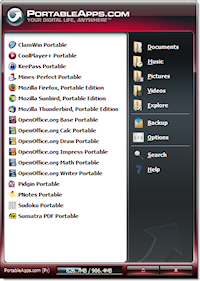
PortableApps, for those that don't know, are a collection of free, open source applications, similar to U3-enabled flash drives. They are bundled with a launcher for on-the-go access, especially via memory card or flash drive.
Some of the more popular applications that have been converted to portable applications include Mozilla Firefox, Thunderbird, Sunbird, Pidgin, Sumatra PDF, and OpenOffice.org, but the PortableApps.com database is huge and includes tens of more applications; at least one hundred.

The PortableApps.com 1.5 in question here is PortableApps' launcher/client. 1.5 includes a bunch of new features, including a new display engine (and new customizable themes, coming in the next release), application renaming and icon hiding, more language support (37 languages at the moment), wallpaper swapping, and more.

See here for more details.

The Baron's Classics the Second

Tally Ho, old chaps. I present before thee another ingenious invention. It is a classic in the sense that it's quite simple, and yet quite functional and practical.

I clarify that it is not the steam-powered grenade depicted to the right, though it does satisfy both requirements of simple and functional.

AutoClick 2.2

It has acquired the functionality of a variety of automated clicking apparati, yet a few features have deemed it "a notch higher" than the remaining assortment of programs of its kind.

For one, it has a hotkey. It is surprising the quantity of auto-clickers, if you will, that lack a hotkey of sorts. This is multiplied in utility when coupled with Windows Hider

Basic functionality is included. Additionally, the species of click is entirely customizable, encompassing such permutations like a double right click. The hotkey may be decided upon entirely by the user. Click Interval is simply defined as 'awesome'. If one has mind to, one may play something of a practical joke with windows hider and Autoclick. Set the hours as high as you can be bothered to place it. Following that, define the Freeze Pointer value as True. Or click the button. Hide Autoclick. Observe the 'lulz' ensue.

Smart Click is the piece de resistance of this rather simple little package. Personally, I've only made 'practical' usage of this contrivance with a flipbook of sorts, when I cannot be bothered to create one by my own hands. The 'engrish' is questionable, but the digital appliance is a quality tool.

iPhone SDK 3.0 is out for developers

The new firmware for the iPhone has come out for developers, and is to come to the end users by later this year around summer. The newest features are really interesting and should make you reconsider if you want to get it or not if you have an iPod Touch. In recent weeks, the iPod Touch 2g has finally been jailbroken, and that allows you all to use it for homebrew purposes and now once the official supported jailbreaks come out, I am all for jailbreak. However, once summer rolls around and the 3.0 SDK is released for purchase, the iPhone owners will surely upgrade and then wait for the jailbreak for 3.0 to come out, but it will probably pose a harder change for iPod touch owners.
Among the newest features from apple with the newest firmware, we find copy, cut and paste, landscape mode for notes, and mail, accessory support, and many other features.
[via Apple iPhone 3.0 preview event]
Update: You know that bluetooth chip that we all found in the iPod Touch 2G for the Nike+ when we were taking them apart? It turns out that that chip was really a bluetooth chip, and when firmware 3.0 finally comes out, we the proud iPod Touch 2G users will be able to use bluetooth enabled headphones.

Today the iPhone OS 3.0 is coming

We all know how popular the iPhone and iPod touch products have been, and now today is the day that the third version of the iPhone operating system is to come. Read about it at the Gizmodo liveblog where the event will begin at 1PM EST.
On a different topic, do you need Microsoft office? Not willing to drop more than a hundred dollars? Do you have enough morals keeping you from pirating it? Are you a student at a school/college that gave you a school email? Then these deals are perfect for you at Microsoft.

[iPhone event via Gizmodo Live Blog]
[Ultimate deals via Microsoft student discounts]

UPDATE: Copy, cut and paste have finally been announced!!!

Monday, March 16, 2009

Assassin's Creed

Not the most recent games, so far, but also not very old. Assassin's Creed breaks new ground when it comes to the action/adventure genre.

Like the title implies, you're an assassin, named Altaïr and you have to assassinate people. This storyline takes place in the Holy Land in the Third Crusade. Lots of history.

Just so I won't spoil the plot, the game basically revolves about Altaïr trying to regain his honor, which he loses when he "compromises the brotherhood" (quote from Altaïr's master, himself, Al Mualim, leader of the assassins). Then, after every mission you complete, you gain another skill that will help you in your quest. Of course, being an assassin, guards and soldiers will try to kill you on sight, so you can either stay and fight them, or run. Either way, you have to escape and lose them. Leaving dead bodies everywhere in the city isn't exactly the ideal way of completing the game, but it'll earn you a few achievements for the Xbox 360. The combat isn't the best because it's really easy to win and the bad guys just stand there and attack one by one. It's hard in the beginning of the game, until you get the ability to counter attack. Then, they drop dead, one by one. You have a sword, a short blade (which includes a bunch of small knives you can you can use to throw at enemies, but you have to pickpocket thugs to restash your stock), your fists, and a hidden blade. It's awesome, especially when you realize that you can use that short blade in combat. You can't attack people with it, but when they attack you, you can counterattack, and there's this crazy awesome move that's an instant kill.

But the best part of the game is running around and climbing walls, better than monkeys and Spidermen. It's so realistic, you'd probably try to do that if you could. There's almost nothing you can't climb up to. Leaping across rooftops and fooling around is actually really fun. The cities are just as awesome. The people react to what you do, if you bump into them, attack them, or climb up a wall near them. I've heard this one, too many times: "God save him; he's gone mad." The coolest parts of the game are when you climb to the highest points in the game and then, the camera moves around so you can see everything below. It's crazy. And when you jump down to a stack of hay, it's almost thrilling, the first time you experience it.


Unfortunately, this game is very repetitive because of all the side mission you have to complete. You have to do the exact same things 9 times throughout the game, and it gets boring. You can choose to collect all the flags scattered around the areas, kill all the Templars, and save all the citizens, but it's not worth it, unless you want to earn some achievements on the Xbox 360. Either way, you have about 1000 flags to collect, 60 Templars to kill, quite a lot of citizens to save, and you honestly cannot get through all of them without searching online for maps. If you're like me, you've probably already done that. I collected all the flags, killed all the Templars, saved all the citizens, and got all the achievements. It took days. Don't do it, until you've finished the game. Better you have no flags at all, than 87/100 flags that you've found yourself.

I wouldn't recommend buying this game, but I would definitely recommend renting it.

To find more about this game, check out Gametrailers.com and you've GOT to check this trailer out: Veoh.com

Fallout 3

You've probably seen the commercials, or at least heard of this game, Fallout 3. Well, most of the video game addicts know that it's a shooter, and it looks cool. They're probably right.

The graphics in this game is really well designed. It really fits in well with the plotline (you're a guy who lives in a wasted land, where there's radiation everywhere, and you're looking for your missing dad). Of course, with all the missions (the important ones and the side missions, too), you really have no other option other than exploring everything they have in there. Unfortunately, of all these wonderfully designed areas, you don't have an option of leaving checkpoints on your map.

In Fallout 3, you have the option of changing perspectives, which is why I didn't say it was a first person shooter. You're also able to level up in many different areas and acquire different skills after playing the game for some time.

There's also an interesting targeting system where you can select a body part of your enemy as your target.


If you want to learn more about this game, check out Gametrailers.com for a more detailed review.

FSW Quick Tip 1: Windows Desktop Search not for you?

Welcome to the first of the weekly issue of FSW (Freedomstar Weekly) Quick Tip. Every Monday, a new quick tip will be provided to you. All software presented will be free of charge, though some may have a paid version with enhancements available. Most software will be multi-platform, although some may be Windows only. These quick tips will include a basic overview of hte product and a rating for it. A video presentation of this may be available in the future.

Is Microsoft Windows's built in desktop search too difficult for you? Are you looking for fast and efficient searching? Here are two useful programs with instant indexed search, and more.

Copernic Desktop Search:
This winner of CNET Editor's Choice Oct. 04 as well as numerous other awards. This software provides a pleasing tabbed interface and searches all your files on your hard drive. Unlike Google Desktop, it does not search the entire internet. It performs a one-time indexing of your whole hard drive upon install and then performs real time indexing as files are added and deleted. The personal non-commercial version is free although there are paid enhanced versions available. Compare them here.

The free version has flashy ads and gives you an alert of buying the pro version.

Pressing the web search button opens a Copernic Search Engine in your default web browser.

The installation took me 10 seconds with the configuration taking around 5. Searches can also be refined directly from the main search panel for each tab.

Unfortunately, the free version does NOT include search as you type a.k.a Instant Search and does not index network drives, both of which are possible with Google Desktop. Instant Search is partially available in Google Desktop. The preview list of results when you search is instant although the main search from the browser is not. It also lacks plugin support.

Copernic Desktop Search rating:
95/100 (Superior)

Google Desktop:
Google Desktop Search allows you to search your computer just like you would search Google. Instant search results are available and full results are viewed in the browser just like Google. A variety of files are supported for indexing including Gmail and Google Talk chats. You can also choose to have a search bar in your taskbar, deskbar floating around, or the full sidebar similar to Windows Sidebar where you can add numerous gadgets. These gadgets can also be detached. Gadgets include viewing YouTube videos, Weather, Gmail, and much much more. For more details, visit the official Google Desktop page.

Upon installing, it will perform a one time full indexing of your computer. Then after that, it will be performing real time indexing as new files come in. Fully customizable with additional plugins to support more file types.

Note: The version available with Google Pack/Updater appears to be higher than the latest version available at the main site. I recommend using Google created and certified gadgets for third party ones often cause Google Desktop startup to freeze a lot. Some computers may have Google Desktop pre-installed.

Google Desktop tends to use a lot of system resources sometimes with 2 processes.

Pressing Ctrl twice automatically launches a search bar to quickly find files or search the web. Very handy.

Note: If using Windows Vista with Aero enabled and no windows are maximized, the gadget button and search box will cause the taskbar to turn solid black as if a window is maximized rather than translucent. The gadget button also is quite buggy.

Google Desktop rating:
95/100 (Superior)

Personally, I use Google Desktop because it integrates smoothly with Google and it gives me an alternative to Windows Sidebar, although I'm considering on switching. However, Copernic Desktop Search is award winning and powerful. You decide. Which one will you use? Weighing the pros and cons of each, both received a rating of 95.

Email me any questions at: free...@gmail.com
To protect against automated spam, click on the dots to take the Recaptcha test and reveal the email. Thanks.

Thursday, March 12, 2009

Firefox 3.1 Beta 3 is here!

After much delay, Mozilla Firefox 3.1 Beta 3 is finally here! This pre release preview version includes numerous new features and will eventually be incorporated into Firefox 3.5.

New Features:
  • Improved the new Private Browsing Mode.
  • Improvements to web worker thread support.
  • Improved performance and stability with the new TraceMonkey JavaScript engine.
  • New native JSON support.
  • Improvements to the Gecko layout engine, including speculative parsing for faster content rendering.
  • Support for new web technologies such as the
  • Features in earlier versions can be found here: Beta 1 and Beta 2
Collection of screenshots of Mozilla Firefox 3.1 Beta 3. As always, click images to enlarge. Note: The following screenshots contains only default features. No add-ons

Opening Screen and About Page. Notice the New Tab button is here w/o add-ons

Higher Acid3 Tests (93/100)

Private Browsing Feature improved in this beta:

Clear the History/Private Data from a selective period of time, like in Chrome:

Standard SSL Sites will now have the domain in blue.

OGG Videos don't require plugins or players to be played:
Other features of Firefox 3.1 include drag and drop tabs into new windows, Ctrl+Tab Tab switching (the Tab Switch Window like Windows Alt+Tab from Beta 1 coming back in future releases).

Download
Mozilla Firefox 3.1 Beta 3 today and help test the new versions of Firefox if you're interested. By default, it will install into a different directly than the standard Firefox. Therefore, it will not override your current Firefox installation, meaning you will still have your original Firefox installed. Remember that some of your add-ons might not have been updated to work with Firefox 3.1 Beta yet.

It is planned that the version be bumped up to 3.5 in future versions because this was originally planned to be a minor update however numerous new features triggered this decision.

If you don't want to try the beta but normal Firefox versions, download the stable released Mozilla Firefox 3.0 today!

Email me any questions at: free...@gmail.com
To protect against automated spam, click on the dots to take the Recaptcha test and reveal the email. Thanks.